Introduction to LaTeX
LaTeX is a powerful typesetting system widely used for creating high-quality documents, especially in academia, research, and technical fields. Unlike traditional word processors, LaTeX focuses on the logical structure of documents rather than direct formatting, allowing users to produce professional-looking papers, books, and presentations with ease. It is particularly popular for documents containing complex mathematical equations, scientific notations, and extensive references. By utilizing a markup-based approach, LaTeX ensures consistency, automation of formatting, and superior typographic quality, making it an essential tool for researchers, engineers, and publishers worldwide.
Installation
To use LaTeX, you need to install a distribution and an editor:
- TeX Distributions: TeX Live, MiKTeX, or MacTeX
- Editors: Overleaf (online), TeXworks, TeXmaker, or VS Code with LaTeX Workshop extension.
-
Option 1: Install MiKTeX (Recommended)
- Download MiKTeX from the official website: https://miktex.org/download
- Run the installer and follow the setup instructions.
- Choose "Install missing packages automatically" (recommended).
- Install a LaTeX editor like TeXworks (comes with MiKTeX) or TeXstudio (Download).
-
Option 2: Install TeX Live
- Download TeX Live from: https://www.tug.org/texlive/acquire-netinstall.html
- Run the installer and follow the setup instructions.
- Install a LaTeX editor like TeXworks or TeXstudio.
Run the following command in the terminal:
    sudo apt update
    sudo apt install texlive-full
Basic LaTeX Document Structure
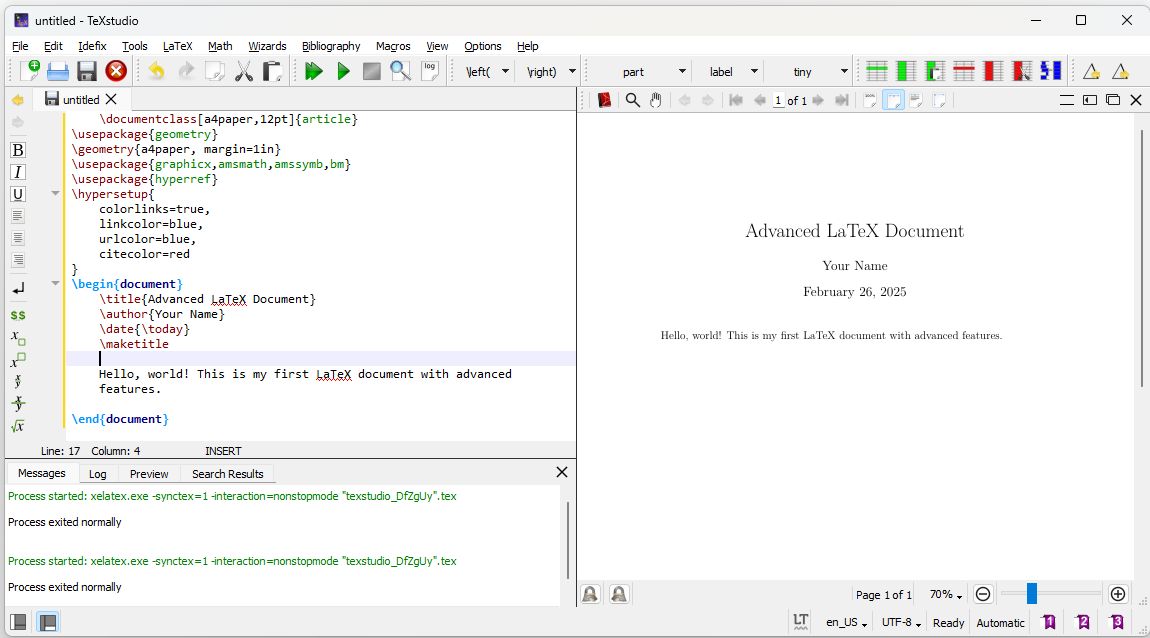
    \documentclass[a4paper,12pt]{article}
    \usepackage{geometry}
    \geometry{a4paper, margin=1in}
    \usepackage{graphicx,amsmath,amssymb,bm}
    \usepackage{hyperref}
    \hypersetup{
        colorlinks=true,
        linkcolor=blue,
        urlcolor=blue,
        citecolor=red
    }
    \begin{document}
    \title{Advanced LaTeX Document}
    \author{Your Name}
    \date{\today}
    \maketitle

    Hello, world! This is my first LaTeX document with advanced features.

    \end{document}
- \documentclass[a4paper,12pt]{article}:
Defines the document type. Options: a4paper: Sets the paper size to A4. 12pt: Sets the font size to 12 points. - \usepackage{geometry}: \geometry{a4paper, margin=1in}: The geometry package allows control over page margins and layout.
- \usepackage{graphicx,amsmath,amssymb,bm} graphicx:
Enables adding images. amsmath: Supports advanced mathematical formatting. amssymb: Adds additional math symbols.bm: Allows bold math sy - \usepackage{hyperref}
\hypersetup{ colorlinks=true, linkcolor=blue, urlcolor=blue, citecolor=red }:
The hyperref package enables hyperlinks and styles them: colorlinks=true: Colors links instead of using boxes. linkcolor=blue: Section links appear in blue. urlcolor=blue: URL links appear in blue. citecolor=red: Citation links appear in red. - \begin{document}:
Marks the start of the document content. - \title:{Advanced LaTeX Document} \author{Your Name} \date{\today} \maketitle Generates the document title using predefined attributes.
- \end{document}:
Marks the end of the document. Anything after this is ignored.
Ouput of the above LaTeX code
Advanced Text Formatting
Font Styles
Bold Text
\textbf{Bold Text}
Italic Text
\textit{Italic Text}
Slanted Text
\textsl{Slanted Text}
Small Caps
\textsc{Small Caps}
Underlined Text
\underline{Underlined Text}
Text Color and Background
This text is red.
\textcolor{red}{This text is red.}
This text has a yellow background.
\colorbox{yellow}{This text has a yellow background.}
This text is custom blue.
\definecolor{myblue}{RGB}{0, 102, 204}\textcolor{myblue}{This text is custom blue.}
Multi-Column Text Layout
This text is in two columns.
\begin{multicols}{2}
    LaTeX is a powerful typesetting system widely used for creating high-quality documents, especially in academia, research, and technical fields. Unlike traditional word processors, LaTeX focuses on the logical structure of documents rather than direct formatting, allowing users to produce professional-looking papers, books, and presentations with ease. It is particularly popular for documents containing complex mathematical equations, scientific notations, and extensive references. By utilizing a markup-based approach, LaTeX ensures consistency, automation of formatting, and superior typographic quality, making it an essential tool for researchers, engineers, and publishers worldwide.
\end{multicols}
Output of the above LaTeX code

2.2 Lists with Custom Styles
- itemize
The itemize environment is used for creating bullet-point lists. It does not assign numbers to items but uses symbols like dots, dashes, or custom markers.\begin{itemize} \item First bullet point \item Second bullet point \item Third bullet point \end{itemize} - enumerate
The enumerate environment is used for numbered lists. By default, items are numbered sequentially. - description
The description environment is used for lists where each item has a label (often used for definitions, terms, or explanations).
\begin{enumerate}
    \item First item
    \item Second item
    \item Third item
\end{enumerate}
\begin{description}
    \item[Apple] A red or green fruit.
    \item[Banana] A yellow fruit.
    \item[Cherry] A small red fruit.
\end{description}
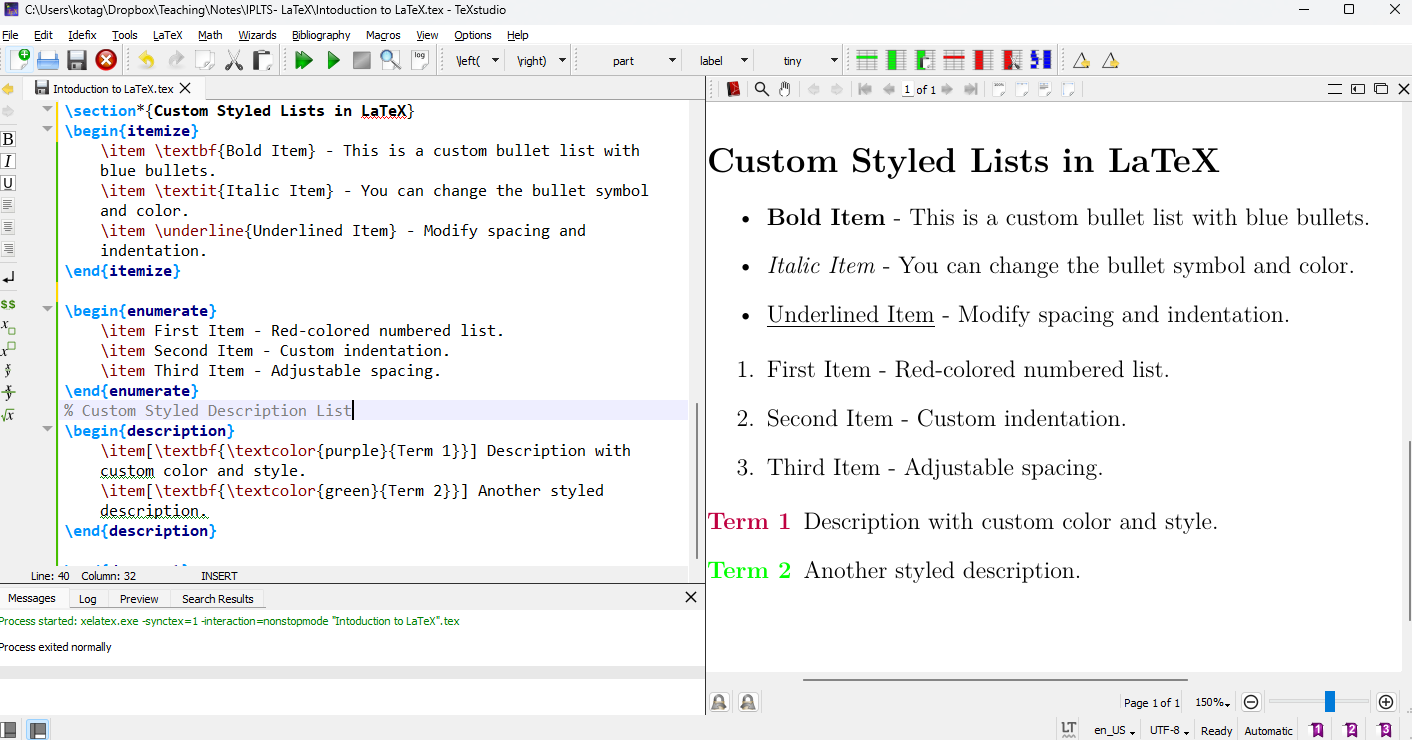
Output of the above LaTeX code
Mathematical Equations
LaTeX is a powerful typesetting system commonly used for mathematical and scientific documents. It provides a comprehensive way to write and format mathematical equations efficiently. This report explores the various mathematical features of LaTeX, including syntax, formatting, and advanced equation handling.
Basic Mathematical Notation
Mathematical expressions in LaTeX are enclosed within special environments:
- Inline equations:
$...$or\(...\) - Display equations:
\[ ... \]or\begin{equation} ... \end{equation}
This is an inline equation: $E = mc^2$.

This is a displayed equation:
\[
E = mc^2
\]
Common Mathematical Symbols
LaTeX provides a vast collection of mathematical symbols, including:
- Greek letters:
\alpha,\beta,\gamma, ...,\omega - Operations:
+,-,\times,\div,\pm - Relations:
=,\neq,\leq,\geq,\approx - Sets:
\in,\notin,\subset,\supset - Logical symbols:
\land,\lor,\forall,\exists
\[ \alpha + \beta = \gamma \]
Fractions, Exponents, and Subscripts
- Fractions:
\frac{numerator}{denominator} - Exponents:
a^b - Subscripts:
x_i
\[ x_i = \frac{a^2 + b^2}{c^2} \]
Matrices and Arrays
LaTeX provides the array and matrix environments for handling matrices.
\[
\begin{bmatrix}
a & b \\
c & d
\end{bmatrix}
\]
Integrals, Summations, and Limits
- Integrals:
\int_{a}^{b} f(x)dx - Summations:
\sum_{n=1}^{\infty} a_n - Limits:
\lim_{x \to \infty} f(x)
\[
\int_{0}^{1} x^2 dx = \frac{1}{3}
\]
Aligning Equations
For multi-line equations, the align environment is useful:
\begin{align}
a + b &= c \\
d - e &= f
\end{align}
LaTeX offers a powerful and flexible system for writing mathematical equations, ranging from basic expressions to complex mathematical structures. Mastery of these tools greatly enhances the clarity and presentation of scientific and technical documents.